 PTB Block Design#
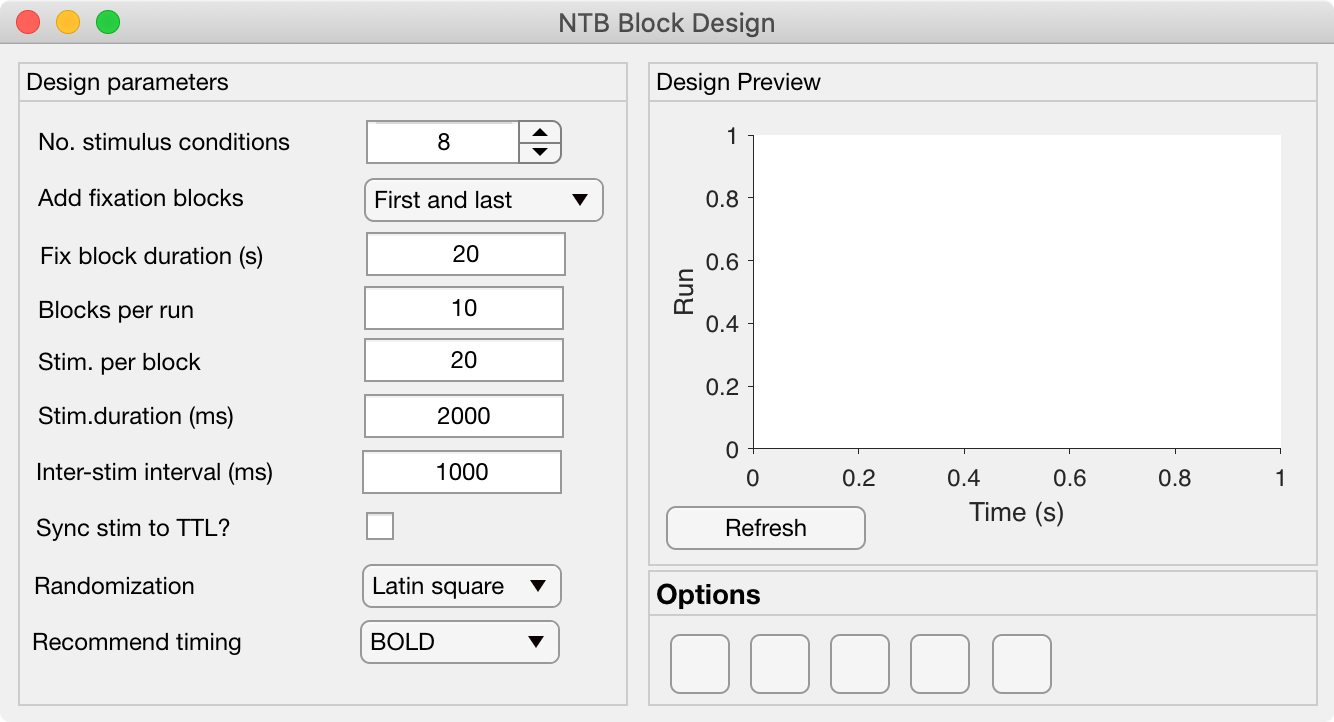
The Block Design GUI allows the user to quickly set variables for generating block design sequences for task-related fMRI experiments. All variables controlled by the Block Design GUI are saved to the Block of the Params object.
Theoretical notes#
The optimization of block designs in fMRI suggest that (Maus et al., 2010)
The order in which experimental conditions occur should obviously be pseudo-randomized, but more specifically there are several options for avoiding sequence repetitions, such as: - Latin square (e.g. Bianciardi et al., 2004) - M-sequences (e.g. Buračas & Boynton, 2002).
Design Parameters Panel#
No. Stimulus conditions:
Add fixation blocks:
Fix block duration (s):
Blocks per run:
Stim. per block:
Stim. Duration (ms):
Inter-stim interval (ms):
Sync stim to TTL?:
Randomization: Select how to randomize conditions within and across blocks. Th options are: - Latin square: pseudo-randomized order with no repetitions of AB sequences - M-sequence: - Totally random: pseudo-random order with no further constraints -
Recommend timing: This optional dropdown menu allows the user to select the fMRI signal / acquisition type being used in order to set recommended timing parameters (mainly block duration). The defaults are: - BOLD: set block duration to 20s - MION: set block duration to 40s - ZTE: set block duration to 60s